# Set it up
This is the easiest way to use earmark. Your library is a GitHub repo. You list what you want to hear in one file, `sources.yml`. When you commit a change to that file, earmark dictates the new entries and updates your podcast feed.
You need a free GitHub account. You do not install anything, you do not pay for a sync service, and you do not run any commands. You set it up once, in four steps.
# 1. Make your repo from the template
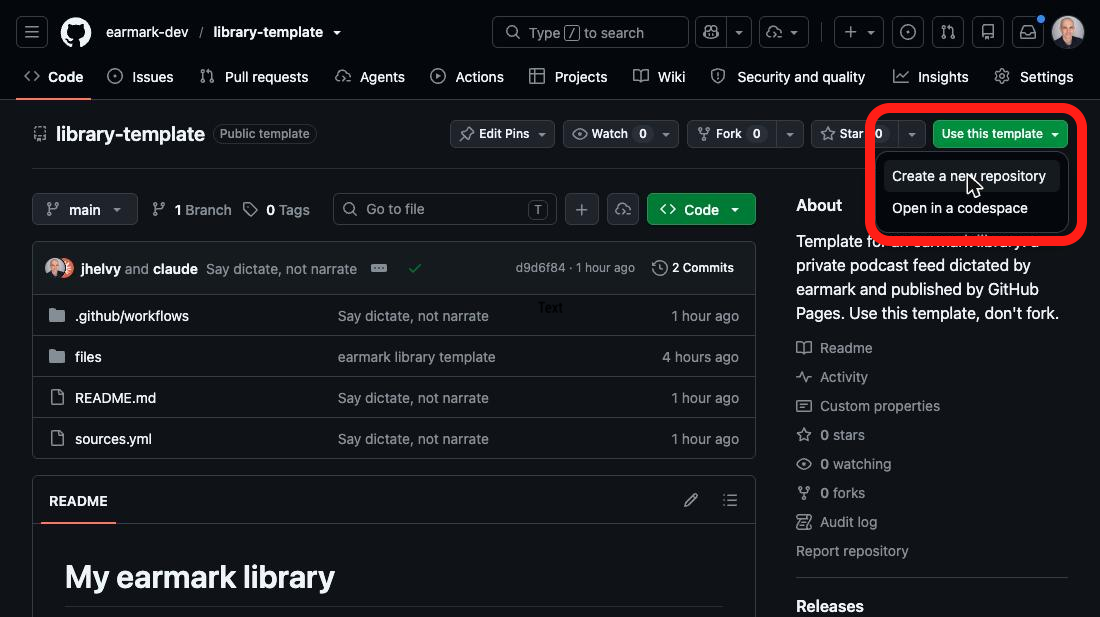
Open [**earmark-dev/library-template**](https://github.com/earmark-dev/library-template) and click **Use this template → Create a new repository**. Give the repo a name and make it **public**.
 # 2. Turn on GitHub Pages
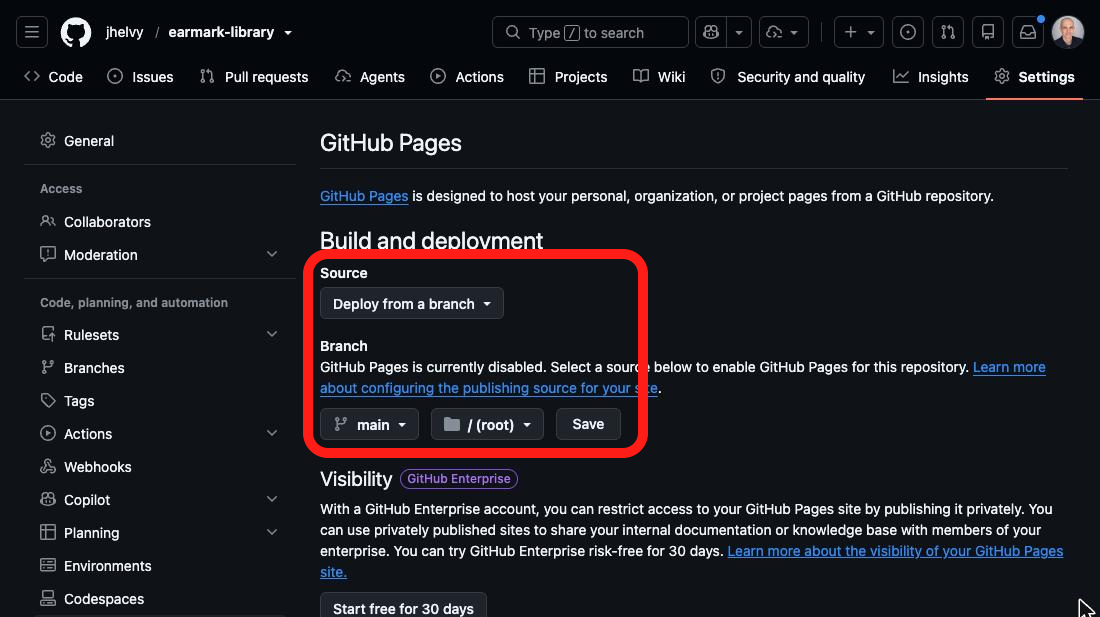
In your new repo, open **Settings → Pages**. Set *Source* to **Deploy from a branch**, branch `main`, folder `/ (root)`, then click **Save**.
# 2. Turn on GitHub Pages
In your new repo, open **Settings → Pages**. Set *Source* to **Deploy from a branch**, branch `main`, folder `/ (root)`, then click **Save**.
 # 3. Check that the first run finished
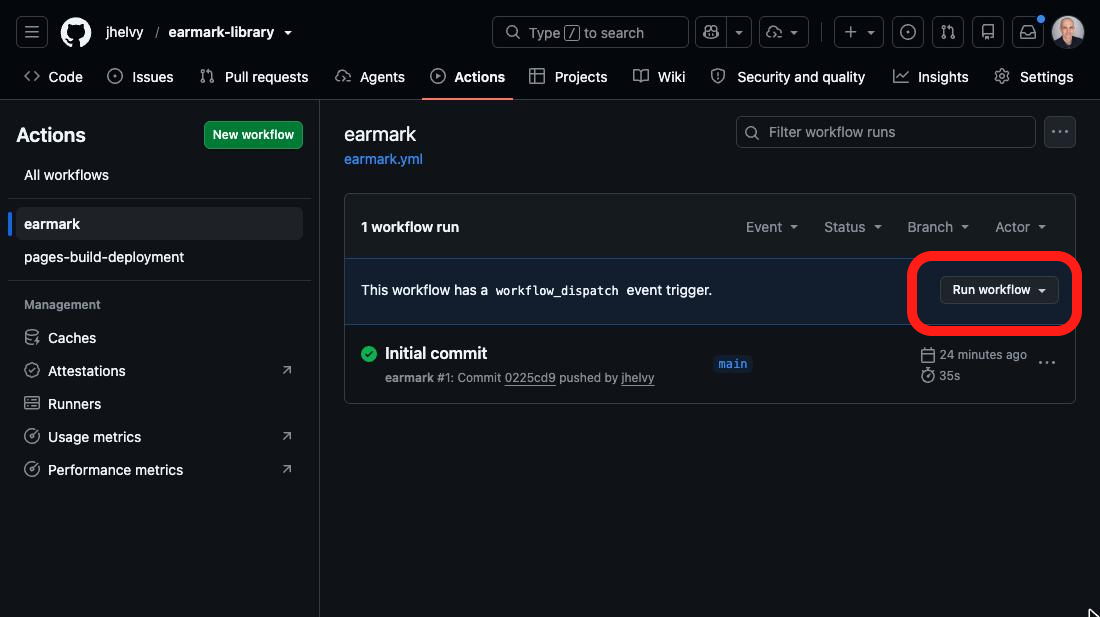
Making the repo started a first run by itself. It creates the library settings and an empty feed, and takes about a minute. Open the **Actions** tab and select **earmark** on the left. The run shows a green check when it is done.
If there is no run, click **Run workflow → Run workflow** to start one.
# 3. Check that the first run finished
Making the repo started a first run by itself. It creates the library settings and an empty feed, and takes about a minute. Open the **Actions** tab and select **earmark** on the left. The run shows a green check when it is done.
If there is no run, click **Run workflow → Run workflow** to start one.
 # 4. Copy your feed URL
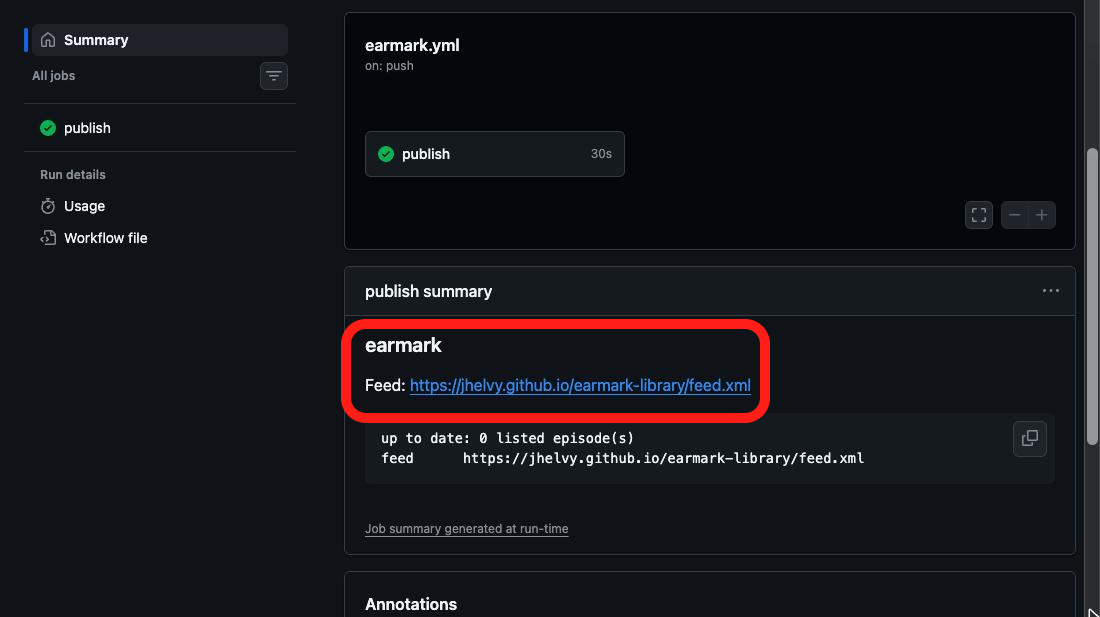
Click the finished run, then scroll down to **publish summary**. It shows your feed URL, which looks like `https://.github.io//feed.xml`.
# 4. Copy your feed URL
Click the finished run, then scroll down to **publish summary**. It shows your feed URL, which looks like `https://.github.io//feed.xml`.
 Next, [subscribe to that URL](subscribe.md) in your podcast app, then [add something](add.md) to listen to.
# Use the Action in another repo
The template is one workflow file that calls the earmark Action. You can add the same file to any repo:
``` yaml
# .github/workflows/earmark.yml
on:
push:
paths: [sources.yml, "files/**", "audio/**", earmark.toml]
workflow_dispatch:
permissions:
contents: write
concurrency:
group: earmark
jobs:
publish:
runs-on: ubuntu-latest
steps:
- uses: actions/checkout@v6
- uses: earmark-dev/earmark@v1
# with:
# base-url: https://audio.example.com # for a custom domain
# title: My Reading Pile
```
`base-url` and `title` apply only to the first run. After that, change them in `earmark.toml`.
Next, [subscribe to that URL](subscribe.md) in your podcast app, then [add something](add.md) to listen to.
# Use the Action in another repo
The template is one workflow file that calls the earmark Action. You can add the same file to any repo:
``` yaml
# .github/workflows/earmark.yml
on:
push:
paths: [sources.yml, "files/**", "audio/**", earmark.toml]
workflow_dispatch:
permissions:
contents: write
concurrency:
group: earmark
jobs:
publish:
runs-on: ubuntu-latest
steps:
- uses: actions/checkout@v6
- uses: earmark-dev/earmark@v1
# with:
# base-url: https://audio.example.com # for a custom domain
# title: My Reading Pile
```
`base-url` and `title` apply only to the first run. After that, change them in `earmark.toml`.